







I approached Revolut as a practical finance app rather than as a replacement for every banking service. Developed by Revolut Ltd, it is built around the idea of bringing everyday money tasks into one mobile experience. That makes it appealing when I want to check spending, move money, save, or explore trading without jumping between several specialist apps. My overall impression is that it offers a broad toolkit, but its value depends heavily on how much of that toolkit I would actually use.
The app is free to install and is rated for Everyone, which makes trying it relatively straightforward from a cost perspective. It is available for Android devices running version 9 or later, and the current version is 10.144.1. That technical baseline is useful to know before downloading, especially if I am using an older phone. On iOS, the experience is also aimed at mobile users who want their finances close at hand rather than tied to a desktop-first service.
How Revolut fits into everyday money management
Revolut sits in the finance category, but it does not feel limited to one narrow task. The app combines spending tools, saving functions, money transfers, and trading-related access in one place. I found that combination most useful when I wanted a quick overview of several parts of my financial life instead of opening a traditional banking app for one job and a separate investment app for another.
The strongest part of the concept is convenience. A person who travels, receives money from different sources, or wants to separate short-term saving from everyday spending may appreciate having those activities gathered together. The trade-off is that a wide feature set can make the app feel busier than a simple current-account app. If I only need to check a balance and pay bills, Revolut may offer more choice than I actually need.
The app has clearly attracted a large audience: it has passed 50 million installs, carries an average rating of 4.5 from around 4.1 million ratings, and has about 12 thousand written reviews. Those figures suggest that the product is widely used, but they do not remove the need to judge whether its particular mix of tools suits my habits. Popularity is reassuring when I am looking for an established app, yet personal finance is still personal; a highly rated service can remain the wrong fit for someone who prefers a very traditional bank.
What the free download really means
The important cost fact is simple: the app itself is free. That makes it possible to explore the interface and decide whether its approach works for me without paying an upfront purchase price. I see that as a meaningful advantage over apps that charge before I can understand their workflow.
At the same time, free installation should not be confused with every possible financial service being free in every situation. Banking, currency exchange, card use, transfers, saving products, and trading can each involve their own conditions. I would read the in-app terms for the exact action I plan to take instead of assuming that the download price explains the total cost of using the service. This is especially important before making an international transfer or placing a trade.
That distinction also affects the value calculation. If I only use the app for basic money organisation, the free entry point may be enough to make it worthwhile. If I expect premium treatment, specialist investment tools, or frequent international activity, I should judge the relevant plan and transaction conditions directly in the app before moving my main finances across.
A realistic day with the app
Imagine I am paid into one account, spend from another, and want to keep a travel fund separate from my normal balance. With Revolut, I could use the main spending area for regular purchases, move a planned amount into savings, and check the overall position from the same mobile environment. If I later need to send money abroad, I would not have to begin by installing a second service simply to investigate the option.
The useful habit here is to give each balance a purpose before moving money. I would decide what is for immediate spending, what is reserved for a near-term goal, and what I am willing to expose to market risk. That separation is more valuable than simply having many buttons in one app. It reduces the chance that a travel budget or emergency reserve gets confused with money intended for trading.
For me, the app works best as a financial dashboard with actions attached. I can review what is happening, then choose whether to spend, save, transfer, or investigate an investment. I would not treat the dashboard as a substitute for a personal budget. The app can make money visible, but I still need to set my own limits and check whether my behaviour matches them.
Spending tools and the convenience trade-off
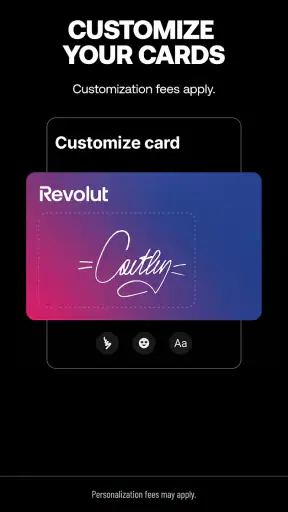
The spending side is likely to attract people who want more control from their phone. A mobile-first view can make it easier to notice recent activity and think about where money is going. That is particularly helpful for people who make many small purchases and otherwise wait until a monthly statement to understand their habits.
However, convenience can encourage impulsive checking or impulsive action. A finance app that places spending, saving, and trading close together may make it easy to move money quickly, but speed is not always a benefit. I prefer to pause before transferring funds or investing, especially when the money was originally set aside for a fixed purpose.
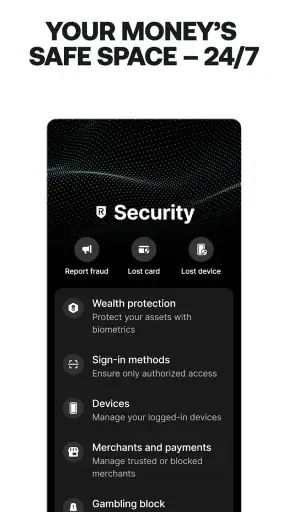
One practical tip is to review the destination before confirming any transfer. When several financial activities live in one app, a rushed tap can send money to the wrong place or blur the difference between a safe reserve and an investment balance. The broad design is useful, but it rewards deliberate organisation.
Saving without losing sight of the goal
The saving element makes sense for short-term goals that benefit from being separated from everyday spending. I would use that structure for something concrete, such as a holiday, a yearly bill, or a replacement phone, rather than treating a labelled balance as proof that I am saving effectively. The goal still needs a target and a regular contribution that fits my income.
A less obvious advantage is psychological: separating money can make a goal feel more real than leaving everything in one undifferentiated balance. The limitation is that organisation is not the same as guaranteed growth. Before choosing any saving-related option, I would check what it is designed to do, how accessible the money is, and whether its conditions match the time frame of my goal.
I would also avoid using the savings area as a place to hide money from my own budget. If I cannot quickly explain why a balance exists and when I might need it, the structure is not helping enough. Revolut can support a disciplined workflow, but it cannot create the discipline on my behalf.
Trading: useful access, higher responsibility
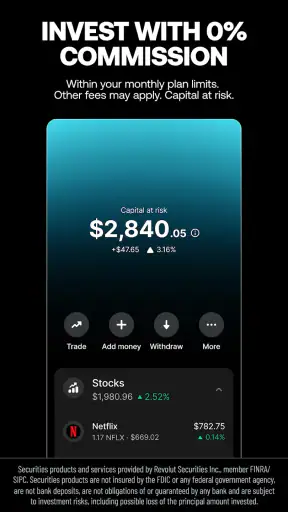
The trading component broadens the app beyond ordinary spending and saving. For someone who wants to explore investments while keeping their financial activities together, that can be convenient. I can see why a user might prefer one familiar interface instead of learning a separate brokerage app immediately.
Still, trading is where I would be most careful. The presence of a trading feature does not make an investment suitable, safe, or appropriate for a short-term goal. I would keep emergency money and essential bills away from anything exposed to market movement. I would also check the instrument, transaction conditions, and any applicable charges before confirming an order.
A useful workflow is to decide the purpose of the money first, then choose the tool. If the money may be needed next month, saving is generally a more understandable starting point than trading. If I am considering a long-term investment, I would compare Revolut with a dedicated investment platform and examine the range of assets, research tools, account arrangements, and costs available to me. The app’s convenience is a strength, but convenience alone is not a reason to invest.
Where it compares well with usual alternatives
Compared with a conventional bank app, Revolut’s appeal is the wider combination of spending, saving, transfers, and trading in one mobile product. A traditional bank may feel calmer and more familiar, particularly for customers who want a focused account view and established branch or support arrangements. Revolut is more attractive to me when I value flexibility and want to manage several money tasks from my phone.
Compared with a specialist trading app, Revolut may be easier for a beginner who does not want a separate financial ecosystem. A dedicated investment platform can be the better choice for someone who needs deeper research, more advanced order controls, or a clearly investment-focused workspace. I would not choose Revolut solely because it places trading next to my spending balance.
Compared with a dedicated budgeting app, Revolut may provide a closer connection between seeing activity and acting on money. A budgeting specialist can still be better for detailed planning, category analysis, long-term reporting, or managing accounts across multiple providers. If most of my finances are outside Revolut, I would check whether its overview gives me enough of the complete picture before relying on it as my main budget.
Small frictions that matter in real use
The first friction is breadth. When an app tries to cover many financial jobs, the interface can require more attention than a single-purpose tool. I would expect to spend time learning where different functions live and reading the details before using unfamiliar services. That is not a serious flaw, but it matters to anyone who wants an almost invisible banking experience.
The second is the risk of overconfidence. A polished mobile interface can make transfers and investing feel equally routine, even though they carry very different consequences. I think Revolut is best used with clear personal rules: a spending limit, a separate emergency reserve, and a cooling-off pause before investment decisions.
The third is that the free price does not answer every value question. A free download is excellent for testing the app, but the right comparison is the total cost of the activities I plan to perform. I would inspect the current terms at the point of use, particularly for international money movement and trading, rather than relying on assumptions formed from the installation screen.
Who is most likely to get real value
I would recommend trying Revolut to people who are comfortable managing money digitally and want several services in one place. It is a particularly sensible candidate for users who travel, move money regularly, want separate saving goals, or are curious about investing without immediately committing to a dedicated brokerage relationship.
It can also suit someone who wants a modern companion to an existing bank account. I would not move every financial responsibility on day one. I would start with a limited, clearly defined use case, learn the app’s layout, test the relevant transfer or saving workflow, and only then decide whether it deserves a larger role.
The people who should hesitate are those who dislike mobile-only financial management, need highly specialised investment research, or want all decisions handled through a traditional adviser. It is also not the right choice for anyone who sees a free download as permission to ignore fees, conditions, or investment risk. A focused bank, budgeting tool, or brokerage service may be better when depth matters more than convenience.
My verdict on the free value
My view is positive, with an important qualification: Revolut delivers the most value when I use its range of tools intentionally rather than treating it as a collection of attractive shortcuts. The free app makes experimentation accessible, and the combination of spending, saving, and trading is genuinely convenient. Its scale, strong average rating, and long presence in the market also make it feel like a serious option rather than a niche experiment.
I would download it if I wanted a flexible finance hub and was willing to check the conditions attached to the actions I take. I would skip it if I only need a basic bank balance, require advanced investment functionality, or prefer a slower, more traditional relationship with financial services. In short, the best value comes from matching each function to a clear purpose: spend for daily needs, save for defined goals, and trade only with money I can afford to expose to market risk.
As an app from Revolut Ltd, it succeeds most clearly at bringing different money decisions into one accessible place. That does not make every option equally suitable, and it does not remove the need for careful financial judgement. For the right user, though, the free starting point and broad mobile toolkit make it worth exploring.


